

Storage access that lives on your phone
Fast, secure, and simple access to your storage unit
Payment Reminder!
No WiFi Needed
No internet? No problem. You can still access your unit and key features offline.
Paid Thru Date
Step-by-step directions to your storage unit with easy, interactive maps right on your phone.
Payment Reminder!

Gate Code at your fingertips
No internet? No problem. You can still access your unit and key features offline.
Never Miss a Payment
Get automatic reminders so you never miss a payment.
How It Works

Tap the link from your facility
They'll text or email it to you

Add StorPass to your mobile wallet
Works with Apple Wallet and Google Wallet

Use your phone to access your unit and get updates
Your StorPass is now saved in your phone's wallet and ready to use anytime
Easy Access to What You Need
FAQ's
A Wallet Pass is a digital card stored in your phone’s wallet app. It shows key info like your gate code, unit number, and payment status—no login required. Think of it as your digital storage access card.
A digital wallet is an app on your phone that stores useful items in one place. This includes store loyalty cards, event tickets, boarding passes, credit or debit cards, and Wallet Passes like your StorPass.
Apple Wallet is the built-in wallet app on iPhones. You don’t need to download anything. Just search for “Wallet” on your phone. Once you tap “Add to Apple Wallet,” your StorPass will appear in the app automatically.
Google Wallet is the wallet app for most Android phones. It’s usually pre-installed, but if not, your phone will guide you through downloading it when you tap “Add to Google Wallet.” Once added, your StorPass will be available even without an internet connection.
Adding your StorPass makes managing your storage faster and easier. Here's what it gives you:
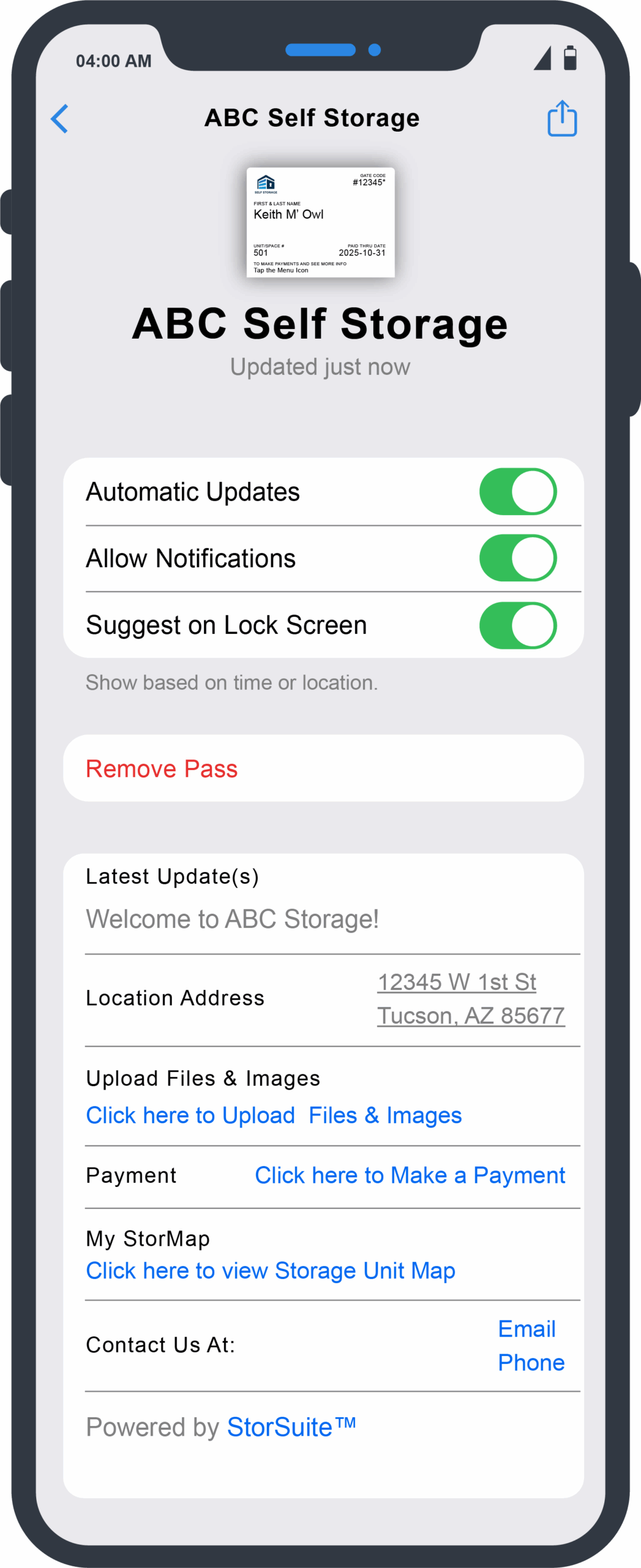
View your gate code, unit number, facility name, address, contact details, gate hours, office hours, and rent-paid-through date all in one spot.
Tap your pass to pay rent online anytime. Set up autopay using the link on the back of the pass. Get reminders when a payment is due.
No app required. No password needed. Just open your phone’s wallet and tap your StorPass.
Yes. Wallet Passes are read-only and secure. No one can alter the information or access your personal data. It’s simply a safe way to view your storage info.
Just tap the “Add to Wallet” button in the message you received. Select your phone type (Apple or Android) and follow the simple instructions. It takes less than 10 seconds.
No. You don’t need to download any extra app. Just use the built-in wallet app on your phone (Apple Wallet or Google Wallet) to access your StorPass.
You can still open your StorPass. Once it's added to your wallet, the information is saved on your device and works even without a connection.
Yes. Your StorPass is read-only and can't be changed by anyone. It only displays key info and doesn’t store sensitive data like passwords or payment details.
If you change phones, you’ll need to re-add your StorPass. Just use the original message link or contact your storage facility to receive a new one.
Yes. Each facility you rent from will send you a unique StorPass. You can add all of them to your digital wallet and switch between them as needed.
Need Help?
If you didn’t receive your StorPass link or need help getting started, contact your facility manager or support team. We're here to help.
Ask Your Facility about

Stay in the loop. Subscribe to our newsletter.
Get the latest storage management tips, updates, and news from StorSuite.
© 2026 StorSuite LLC. All rights reserved.